In the workflow
Why Floyd-Steinberg dithering matters
It is a practical baseline for photo tests because it produces an irregular, economical dot pattern without a large repeating matrix.
Practical check
How to evaluate it
Use Floyd-Steinberg as a compact baseline, then compare the same crop with Jarvis and Stucki. Look for local detail, noise, and whether nearby dots are likely to merge on the material.
See the pixels
Floyd-Steinberg dithering, shown on the same portrait
Floyd-Steinberg passes error to four nearby pixels. In the example, follow the eye outline into the cheek: the edge and the surrounding gray are both built from the same black-and-white pixels.

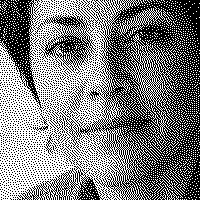
Floyd-Steinberg: Use it as a baseline. Compare the small dots around the eyes and the transition from cheek to shadow.
Matching 200 × 200-pixel crops, taken after the full images were dithered. Previews fit your screen. Open a downloaded PNG at 100% to inspect the actual pixels.
Computed bitmap examples from EngravePrep's bundled sample portrait. These are not physical engraving results or a material recommendation.




If the hair becomes one dark mass in every version, revisit the source tones before changing algorithms. A dither cannot recover detail that is already missing.
Go deeper
Floyd-Steinberg vs Jarvis vs Stucki for Laser Engraving
Compare Stucki, Jarvis, and Floyd-Steinberg with computed one-bit PNG examples, matching detail crops, and practical checks for laser photo preparation.
Read the complete guide