What to know first
- Floyd-Steinberg uses a compact error-diffusion neighborhood and is a useful general baseline.
- Jarvis spreads error more broadly and often produces smooth photographic transitions.
- Stucki serves a similar photographic role with a somewhat different balance of sharpness and processing behavior.
- The best choice is the one that preserves the subject at final size and survives the tested material process.
Stucki vs Jarvis: what actually changes?
Jarvis and Stucki spread conversion error to the same 12 neighboring positions in EngravePrep, but use different weights. That changes the dot arrangement even when the source, output size, and tonal settings are identical. Floyd-Steinberg uses a smaller four-neighbor pattern as a useful comparison.
Start with the same portrait and switch between the methods below. Compare the eye contour, the cheek's midtones, and the transition into dark hair. There is no universal winner: choose a file that preserves your subject, then check what the intended material and machine can reproduce.
| Method | Error spread | What to compare |
|---|---|---|
| Floyd-Steinberg | 4 neighbors across the current and next row | Use it as a baseline. Compare the small dots around the eyes and the transition from cheek to shadow. |
| Jarvis | 12 neighbors across the current and next two rows | Compare the cheek's midtones with Stucki while keeping the eye and eyebrow edges in view. |
| Stucki | 12 neighbors, with different weights from Jarvis | Switch between Stucki and Jarvis. Look at the eye contour and nearby midtone texture, not just overall darkness. |
Compare the same portrait, one dither at a time
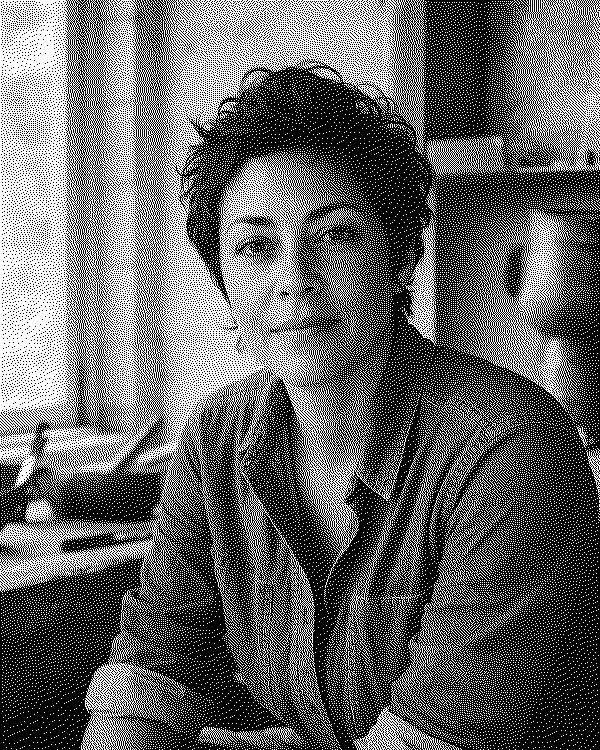
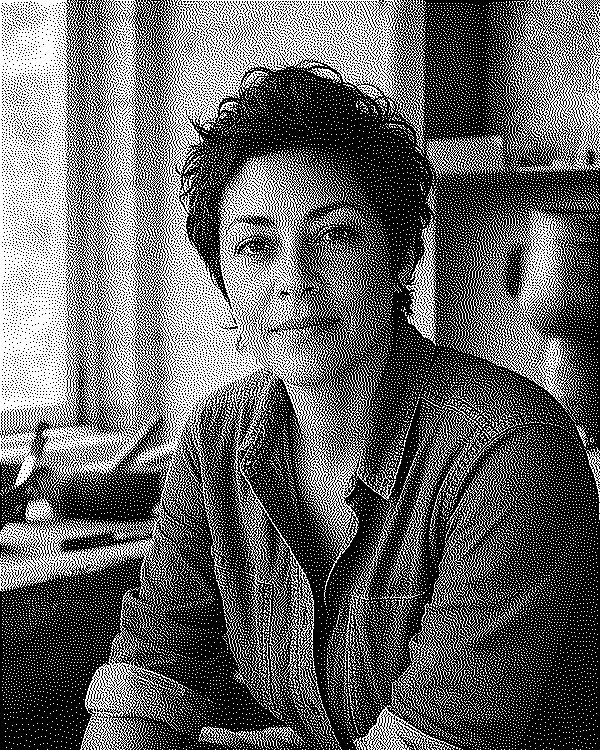
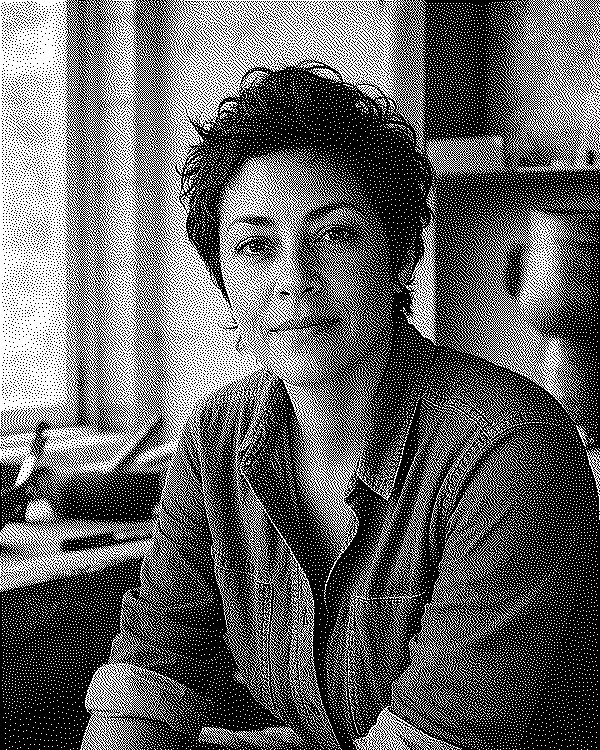
These examples use EngravePrep's actual dithering engine on one fixed grayscale input. Switch algorithms to compare the full portrait, or select Detail crop to inspect the same eye and cheek region. The only changed processing choice is the dither method.

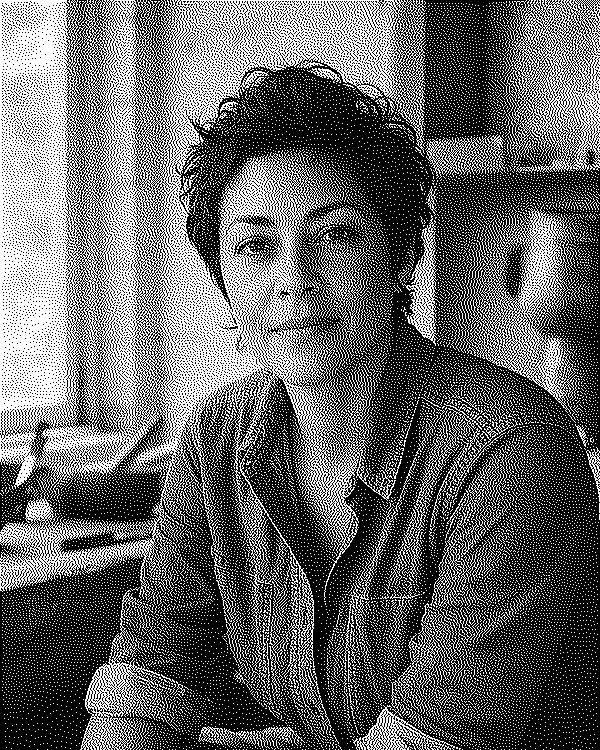
Jarvis: Compare the cheek's midtones with Stucki while keeping the eye and eyebrow edges in view.
The same 600 × 750-pixel input for all three methods. Previews fit your screen. Open a downloaded PNG at 100% to inspect the actual pixels.
Computed bitmap examples from EngravePrep's bundled sample portrait. These are not physical engraving results or a material recommendation.

How these examples were made
The source is the sample portrait bundled with EngravePrep. It was converted to grayscale and resized once to 600 × 750 pixels before processing. No additional tone adjustment, sharpening, material preset, or inversion was applied.
Each file was computed with the same Swift DitherEngine used by the app. The 200 × 200-pixel details were cropped from the finished outputs at x=190, y=200, measured from the top left. The downloadable dithers are lossless, one-bit grayscale PNGs.
This controlled input isolates the dither algorithm; the app's complete editing pipeline can produce different results. The 300 DPI metadata describes a 2 × 2.5-inch file, not a tested machine setting.
View the generation record and file checksums. Physical engraving comparisons remain separate in our benchmark protocol.
All three are error-diffusion dithers
Floyd-Steinberg, Jarvis, and Stucki convert continuous tone into black and white pixels. Each pixel decision creates an error relative to the original tone, and the algorithm distributes that error into neighboring pixels that have not yet been processed.
The methods differ in how broadly and with what weights they distribute that error. This changes dot texture, edge behavior, and tonal transitions. It does not change the underlying requirement: the source tone, output size, and material process still determine what detail can survive.
Floyd-Steinberg is the compact baseline
Floyd-Steinberg diffuses error through a relatively small neighborhood. That can produce a fine, active texture with good local detail, making it a useful baseline for portraits, pets, and objects with clear edges.
A compact pattern can also make local noise or abrupt transitions more visible when the source is poorly prepared. Fix exposure, gamma, contrast, and background separation before assuming the algorithm is the problem.
Sources: 1
Jarvis favors broad, smooth transitions
Jarvis distributes error across a wider neighborhood. Current xTool documentation describes it as producing softer transitions than Floyd and working well across many images. Current LightBurn guidance also presents Jarvis as a strong choice for smooth-shaded or photographic sources.
The broader pattern can make skin, skies, and gentle gradients feel smoother, but the material still has to resolve the marks. Dense dots that look elegant on screen may merge when line spacing, spot size, heat spread, or surface response is too broad.
Stucki balances smoothness and a cleaner texture
Stucki belongs to the same broad photographic family as Jarvis. xTool describes it as processing somewhat faster than Jarvis and producing a cleaner, sharper image. LightBurn also positions it as a smooth-shaded photo mode with behavior similar to Jarvis.
That makes Stucki worth comparing when Jarvis feels too soft or dense, but the description is not a guaranteed material outcome. Evaluate hair, eyes, texture, and midtone separation on the actual crop instead of choosing from the algorithm name alone.
Compare them without moving the goalposts
Use one nondithered source, one crop, one tonal treatment, one physical size, and one DPI. Export a Floyd-Steinberg, Jarvis, and Stucki version from those identical inputs. Compare the full composition first, then inspect the one-bit pixels at 1:1.
- Check the subjectLook for readable eyes, hair, fur, edges, and separation from the background.
- Check the tonal endsConfirm that important highlights stay open and deep shadows do not become one solid field.
- Check the midtonesCompare whether faces and curved surfaces transition naturally or become noisy and flat.
- Check the actual dotsLook for isolated noise, visible repeating texture, or clusters likely to merge on the material.
- Burn the finalistsTest the strongest two or three variants on the same scrap with the machine variables held constant.
Use a starting rule, then let the test decide
Start with Floyd-Steinberg when you want a familiar, compact baseline. Add Jarvis when smooth tonal transitions are central to the image. Add Stucki when you want another photographic option with a cleaner or sharper character.
If all three fail in the same regions, return to the source tone, crop, final dimensions, or physical process. Switching algorithms cannot restore clipped highlights, an out-of-focus face, merged scan lines, or detail smaller than the material can reproduce.
Apply one dither and preserve it
Once you choose a result, treat its one-bit pixels as the finished artwork. Do not resize it casually or apply another dither after import. Use the destination's preserve-pixels workflow and confirm the physical dimensions before engraving.
If the job size changes, return to the continuous-tone source and create a new dither for the new pixel grid.
Sources: 2
Glossary
Terms in this guide
A closer look at the terms used above, with examples.
- Error diffusionA dithering family that passes the difference between an original tone and its black-or-white decision into neighboring pixels.
- Floyd-Steinberg ditheringA widely used error-diffusion algorithm that distributes conversion error into a compact set of nearby pixels.
- Jarvis ditheringAn error-diffusion method that spreads error across a broader neighborhood than Floyd-Steinberg.
- Stucki ditheringAn error-diffusion method with a broad distribution pattern often used for smooth-shaded photographic images.
- Atkinson ditheringAn error-diffusion dither associated with a relatively light, crisp dot pattern because it passes only part of the quantization error onward.
- 1-bit bitmapA raster image in which every pixel has only two possible values, usually black or white.
Common questions
Is Jarvis better than Floyd-Steinberg for laser engraving?
Not universally. Jarvis often produces smoother transitions, while Floyd-Steinberg is a compact baseline that can preserve local character. Compare both at the final size on the intended material.
What is the difference between Jarvis and Stucki dithering?
Both spread error across a broad neighborhood and suit photographic work. Their weights differ, producing somewhat different smoothness, sharpness, and dot texture. The practical difference should be judged on the same source and material test.
Can I resize a dithered image after choosing an algorithm?
Avoid it. Resizing can erase, merge, or duplicate the finished dots. Return to the nondithered source and generate a new one-bit image for the new dimensions.
Sources and further reading
We used the manufacturer and software documentation below. Check the manual for your exact machine before choosing settings or buying an upgrade.
- How to Set Bitmap ModexTool Support Center. Checked October 22, 2026.
- Image ModeLightBurn User Guide. Checked October 22, 2026.
- Interval TestLightBurn User Guide. Checked August 2, 2026.