In the workflow
Why Stucki dithering matters
It is worth comparing with Jarvis and Floyd-Steinberg on the same final-size crop because material response can reverse a screen preference.
Practical check
How to evaluate it
Compare Stucki with Jarvis on identical output files. Check whether its different weighting preserves useful edge texture without making midtones too dense for the tested material.
See the pixels
Stucki dithering, shown on the same portrait
Stucki reaches the same neighboring positions as Jarvis in EngravePrep, but uses different weights. Switching between the matching crops isolates that change: source, size, tone, and polarity stay fixed.

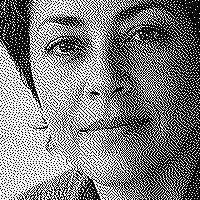
Stucki: Switch between Stucki and Jarvis. Look at the eye contour and nearby midtone texture, not just overall darkness.
Matching 200 × 200-pixel crops, taken after the full images were dithered. Previews fit your screen. Open a downloaded PNG at 100% to inspect the actual pixels.
Computed bitmap examples from EngravePrep's bundled sample portrait. These are not physical engraving results or a material recommendation.




Stucki is an alternative to compare, not a guaranteed sharper result. Keep the version that preserves the features you need, then test it on the intended material.
Go deeper
Floyd-Steinberg vs Jarvis vs Stucki for Laser Engraving
Compare Stucki, Jarvis, and Floyd-Steinberg with computed one-bit PNG examples, matching detail crops, and practical checks for laser photo preparation.
Read the complete guide